Fill in attendance
Find Attendance in the right upper corner. This is an electronic attendance automatically generated by the system with names and dates to fill in.
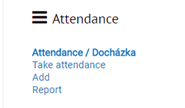
Attendance/ Docházka shows an overview of the sessions in a course.
Take attendance takes you to the current session.
Add lets you add a new session.
Report shows a percentage for each student for each session.
When in the attendance overview, you can add information about the lesson clicking the Edit icon.
