 Language Hub, s. r. o.
FAQ for Teachers
Fill in attendance
Find Attendance in the right upper corner. This is an electronic attendance automatically generated by the system with names and dates to fill in.
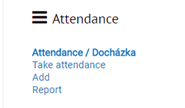
Attendance/ Docházka shows an overview of the sessions in a course.
Take attendance takes you to the current session.
Add lets you add a new session.
Report shows a percentage for each student for each session.
When in the attendance overview, you can add information about the lesson clicking the Edit icon.
